
The five apps quietly costing you 1.2s of load time
How to audit third-party scripts on a live Shopify store without breaking your tracking or your reviews widget.
Start with the network tab, not the app list
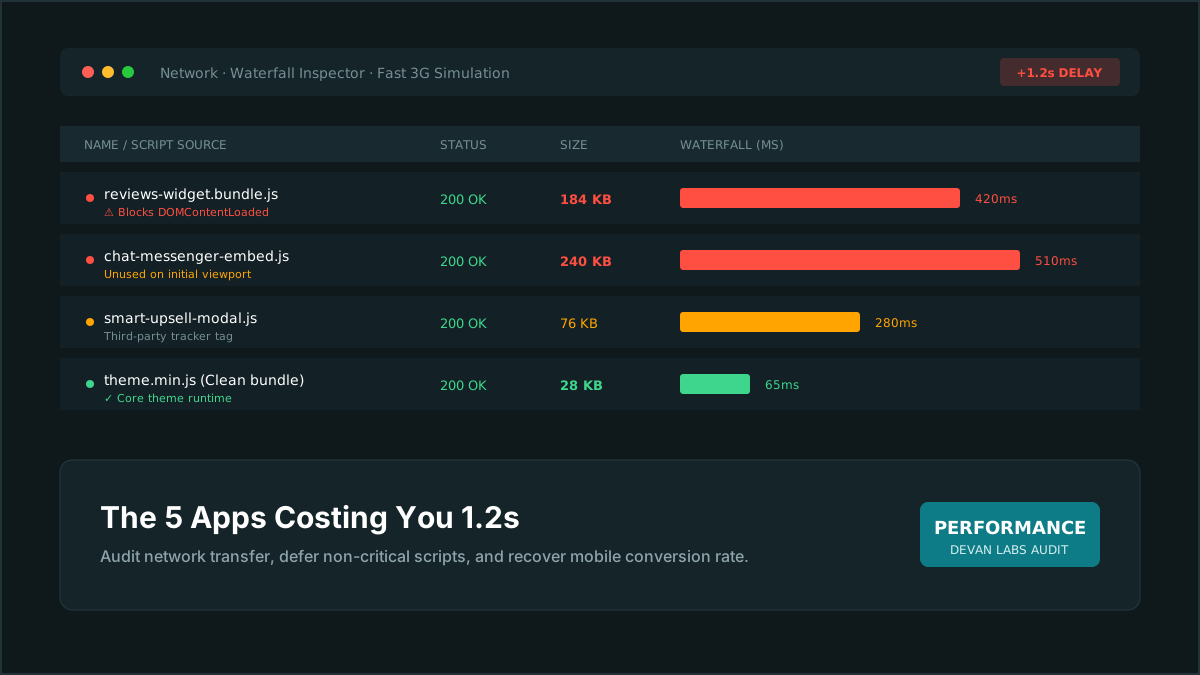
Shopify's app list tells you what is installed, not what is loading. Open a product page in an incognito window, throttle to Fast 3G, and sort the network panel by transfer size. What you are looking for is any third-party script over 40KB that blocks first paint. On most stores we audit, the top offenders are a reviews widget, an upsell app, a chat widget, a country selector, and a loyalty popup — roughly in that order.
Reviews widgets are worth the effort to fix
A reviews app typically loads 120–200KB of JavaScript on every page, including pages with no reviews on them. Most have a setting to load only on product pages, and most merchants never touch it. If yours renders stars on collection cards, ask whether the star rating can come from a metafield instead — the number is already in your catalogue, and rendering it in Liquid costs nothing.
Chat widgets belong behind a click
A live chat bundle is usually the single heaviest script on a storefront, and it is almost never needed in the first three seconds. Replace the auto-loading embed with a plain button that loads the widget on click. Support volume does not drop measurably, and you get 300–500ms back on mobile LCP.
The apps you cannot remove
Subscription and loyalty apps often have to load early because they change prices on the page. Do not fight those. Instead, delay everything else so the necessary script is not queued behind three optional ones. Load order matters more than script count once you are down to the essentials.
Measure before and after, on the same connection
Run Lighthouse three times on mobile emulation and take the median. Comparing a single before run to a single after run is how people convince themselves of improvements that are not there. And re-check your tracking after every removal: nothing is worse than a fast store that stopped recording purchases.
Want this checked on your own store?
We'll run the same review on your storefront and send you the findings in three business days. Free, and yours to keep.
Get my free audit